Intro
Feed
A collection of short notes, interesting links, and the occasional long form post.
Items
-
Moon Phase Calendar – Unlock Lunar Wisdom with MoonX
moonx.app

don’t understand how come so many russians sharing this niche hehe
-
Nyc Music Os - Design Enthusiasts Hub
www.behance.net
like design
-
Built a Real-Time Basketball Coaching Web App with Gemini 2.5 Pro
medium.com
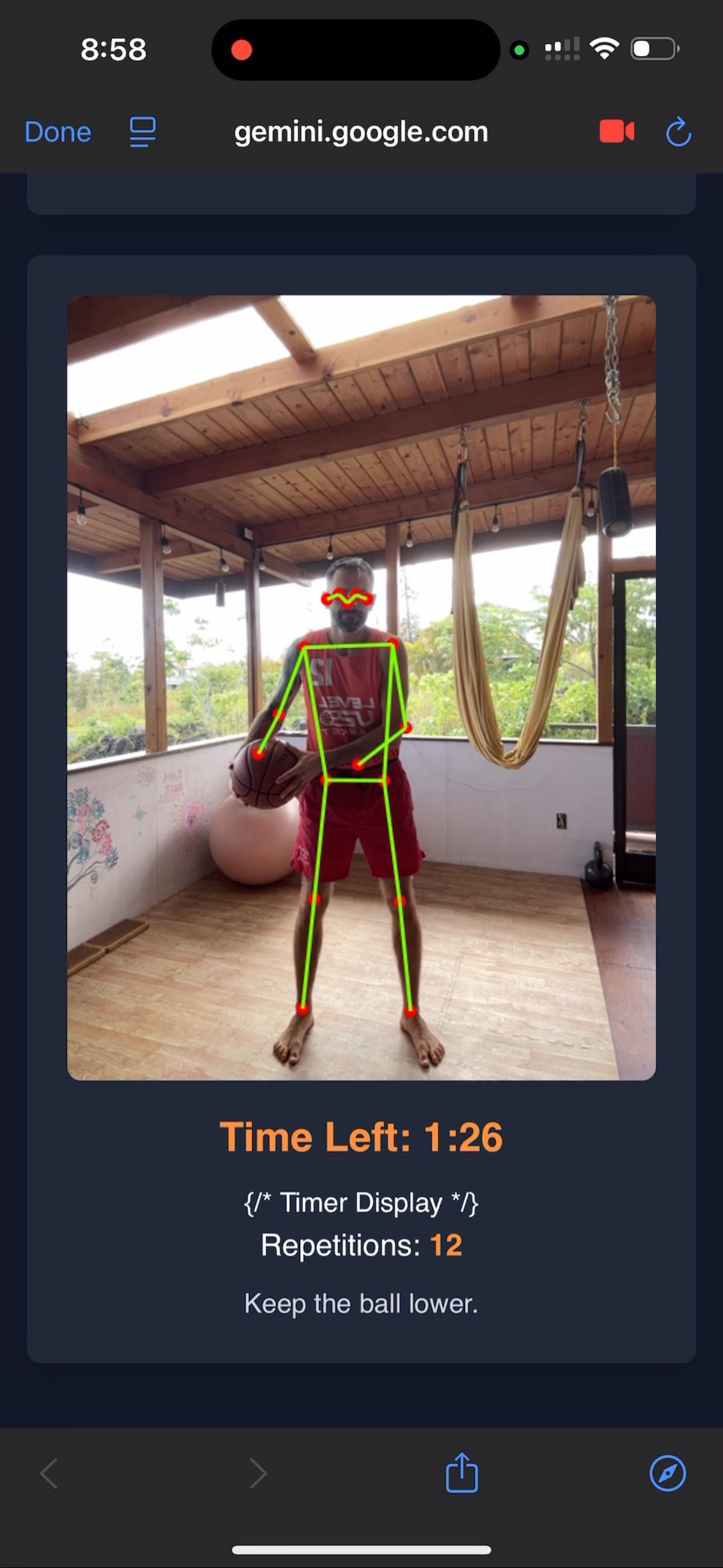
like the enthusiam this guy shows about apps and stuff he builds
-
My Obsidian Setup
www.reddit.com
-
Philosophers Rumble Over Van Gogh’s Shoes
harpers.org

Cologne’s Wallraf Richartz Museum has launched an impressive new exhibition entitled “Vincent van Gogh: Shoes,” built around a celebrated painting by the
-
Ask HN: What did you read in 2025?
news.ycombinator.com
-
Consider it done! Plan making can eliminate the cognitive effects of unfulfilled goals
pubmed.ncbi.nlm.nih.gov
Unfulfilled goals persist in the mind, as asserted by ample theory and evidence (e.g., the Zeigarnik effect). The standard assumption has been that such cognitive activation persists until the goal is fulfilled. However, we predicted that contributing to goal pursuit through plan making could satisf …
-
Natto.dev: Create JavaScript Art on a 2D Canvas
natto.dev

love its minimalistic design and canvas
-
Non-Zero-Sum Games: Exploring Cooperative Strategies in Game Theory
nonzerosum.games
-
Paul Bloom: 2025: A Reckoning
open.substack.com
-
- Published
Discovering Troops Tennis Academy: Bangkok's Hidden Gem for Tennis Enthusiasts
Join us as we explore Troops Tennis Academy, a top-notch facility in Bangkok, perfect for players of all levels. With its vibrant courts and welcoming atmosphere, it’s quickly become a favorite destination for tennis lovers in the city.

-
- Published
Unlocking the Mind: Exploring 'A Brief History of Intelligence'
Dive into Max Bennett's latest book, which examines the evolution of intelligence, the rise of AI, and the groundbreaking insights that shape our understanding of the brain. Discover why this compelling read has captivated thinkers, including Nobel laureate Daniel Kahneman.

-
- Published
The man who lends his money to a government
...is in the same position as the bad men in Shakespeare who hire murderers.
-
- Published
Man can do what he wills, but he cannot will what he wills
-
A 97-Year-Old Philosopher Faces His Own Death
www.youtube.com
-
Introducing DuckLake
www.youtube.com
-
- Published
From Puddle to Lake: Auto-Transforming Your Raw Data with Cloudflare Event Notifications
Set up automatic data transformation for your Cloudflare data lake. This step-by-step guide shows how to configure event notifications and Workers to seamlessly process raw pipeline data into analytics-ready Iceberg tables.

-
- Published
Foundation & Strategic Alignment
-
- Published
Text Reveal on Scroll Animation (anime.js)
A smooth animation that reveals text elements and SVG drawings as the user scrolls, transitioning them from half-visible to fully visible with subtle movements and opacity changes.

-
- Published
With Email Workers you can leverage the power of Cloudflare Workers to implement any logic you need to process your emails and create complex rules. These rules determine what happens when you receive an email. read more ->
-
- Published
If you haven’t scrolled enought on hono’s documentation and ended up googling the problem:
If you are developing an application for Cloudflare Workers, a streaming may not work well on Wrangler. If so, add Identity for Content-Encoding header.
app.get('/streamText', (c) => { c.header('Content-Encoding', 'Identity') return streamText(c, async (stream) => { // ... }) }) -
- Published
(based on writing https://alexkrupp.typepad.com/sensemaking/2021/06/django-for-startup-founders-a-better-software-architecture-for-saas-startups-and-consumer-apps.html)
You are an expert in Python, Django, and scalable web application development.
Predictability
-
Every Endpoint Should Tell a Story
-
Explanation: Structure each REST API endpoint to follow a consistent pattern. This makes your code predictable and easier to understand. The pattern includes specifying permissions, handling inputs, performing business logic, and returning responses in a standard way.
-
Example:
from rest_framework.views import APIView
from rest_framework.permissions import IsAuthenticated
from rest_framework.response import Response

class UserProfileView(APIView):
    permission_classes = [IsAuthenticated]

    def get(self, request):
        # Step 1: Copy input to local variables
        user_id = request.query_params.get('user_id')

        # Step 2: Sanitize input
        user_id = sanitize_input(user_id)

        # Step 3: Validate input
        if not user_id:
            return Response({'error': 'User ID is required.'}, status=400)

        # Step 4: Enforce business requirements
        if not user_exists(user_id):
            return Response({'error': 'User does not exist.'}, status=404)

        # Step 5: Perform business logic
        user_profile = get_user_profile(user_id)

        # Step 6: Return HTTP response
        return Response({'data': user_profile}, status=200)
-
-
Keep Business Logic in Services
-
Explanation: Separate your business logic from views and models. Place it in service modules to promote reusability and maintainability.
-
Example:
# services/user_services.py
def get_user_profile(user_id):
    # Complex logic to retrieve and process user profile
    pass

# views.py
from services.user_services import get_user_profile
-
-
Make Services the Locus of Reusability
-
Explanation: Reuse service methods across your project wherever the same functionality is needed. This avoids code duplication and keeps your logic consistent.
-
Example:
# services/notification_services.py
def send_welcome_email(user_email):
    # Logic to send email
    pass

# Used in multiple places
send_welcome_email(user_email)
-
-
Always Sanitize User Input, Sometimes Save Raw Input, Always Escape Output
-
Explanation: Sanitize all user inputs immediately to prevent security vulnerabilities like XSS attacks. Save raw input only when necessary for future reference, and always escape outputs when displaying data.
-
Example:
import html

def sanitize_input(input_value):
    return html.escape(input_value)

# Sanitize input
user_input = sanitize_input(request.data.get('comment'))
-
-
Don’t Split Files by Default & Never Split Your URLs File
-
Explanation: Keep related code together to make it easier to find and understand. Avoid unnecessary splitting of files, especially the
urls.pyfile. -
Example:
- Keep all URL patterns in a single
urls.pyfile with clear comments separating sections.
# urls.py from django.urls import path from .views import UserProfileView, UserSettingsView urlpatterns = [ # User-related URLs path('user/profile/', UserProfileView.as_view(), name='user-profile'), path('user/settings/', UserSettingsView.as_view(), name='user-settings'), # Other sections... ] - Keep all URL patterns in a single
-
Readability
-
Each Variable’s Type or Kind Should Be Obvious from Its Name
-
Explanation: Use clear and descriptive names for variables that indicate their type or purpose, reducing confusion.
-
Example:
user_list = []
user_dict = {}
is_active_user = True
-
-
Assign Unique Names to Files, Classes, and Functions
-
Explanation: Ensure that each file, class, and function has a unique name to avoid conflicts and improve searchability.
-
Example:
- Instead of multiple
views.pyfiles, useuser_views.py,product_views.py.
- Instead of multiple
-
-
**Avoid
*argsand**kwargsin User Code**-
Explanation: Use explicit parameters in functions to enhance clarity and prevent unexpected behaviors.
-
Example:
def create_user(username, email):
    pass  # Good

def create_user(*args, **kwargs):
    pass  # Avoid this
-
-
Use Functions, Not Classes
-
Explanation:
- Simplicity and Clarity: Functions are simpler and more straightforward than classes. They perform specific tasks and are easier to read, understand, and test.
- Avoid Unnecessary Complexity: Classes introduce complexity with state management, inheritance, and side effects, which can make the code harder to maintain, especially for small to medium-sized projects.
- Functional Programming Benefits: Emphasizing functions aligns with functional programming principles, leading to more predictable and bug-resistant code.
- Statelessness: Functions that avoid maintaining state reduce the likelihood of unintended interactions and make concurrent execution safer.
-
Guidelines:
- Use plain functions for operations that don’t require object-oriented features.
- Only use classes when you need to maintain state across multiple function calls or when leveraging polymorphism and inheritance is essential.
- Favor pure functions that return outputs solely based on inputs without side effects.
-
Examples:
# Good Practice: Using Functions

# utils/math_utils.py
def calculate_discount(price, discount_percent):
    return price * (discount_percent / 100)

def apply_tax(price, tax_rate):
    return price + (price * (tax_rate / 100))

# Usage in your code
discounted_price = calculate_discount(original_price, 10)
final_price = apply_tax(discounted_price, 5)
# Avoid: Unnecessary Use of Classes # utils/math_utils.py class PriceCalculator: def __init__(self, price): self.price = price def calculate_discount(self, discount_percent): return self.price * (discount_percent / 100) def apply_tax(self, tax_rate): return self.price + (self.price * (tax_rate / 100)) # Usage in your code calculator = PriceCalculator(original_price) discounted_price = calculator.calculate_discount(10) final_price = calculator.apply_tax(5)Why Prefer Functions Over Classes in This Context:
- Reduced Boilerplate: Functions eliminate the need for boilerplate code like
__init__methods. - Easier Testing: Pure functions are easier to test since they don’t rely on or alter external state.
- Better Readability: Functions focus on performing a single task, making the code more readable and maintainable.
- Avoiding Side Effects: Without class state, there’s a lower risk of side effects from shared mutable data.
- Reduced Boilerplate: Functions eliminate the need for boilerplate code like
-
When to Use Classes:
- Stateful Operations: If you need to maintain state between function calls.
- Complex Data Structures: When modeling entities with both data and behaviors tightly coupled together.
- Inheritance and Polymorphism: When you need to extend or modify behaviors through inheritance hierarchies.
-
Example of Appropriate Class Use:
# models/user.py
class User:
    def __init__(self, username, email):
        self.username = username
        self.email = email

    def send_email(self, subject, message):
        # Logic to send email to self.email
        pass

# Using the User class
user = User('john_doe', '[email protected]')
user.send_email('Welcome', 'Thank you for signing up!')
In this case, using a class makes sense because
Userrepresents an entity with attributes and behaviors.
-
-
There Are Exactly Four Types of Errors
-
Explanation:
Standardizing error handling across your application improves consistency and makes your code easier to maintain and debug. The four types of errors are:
- Upstream Errors:
- Errors that originate from middleware or external services before reaching your application logic.
- Handling: Generally, allow these errors to propagate. Customize handling only if necessary.
- Validation Errors:
- Occur when user input fails to meet predefined validation rules (e.g., missing fields, invalid formats).
- Handling: Collect and return all validation errors together with descriptive messages.
- Business Requirement Errors:
- Occur when input is valid, but the action violates business rules (e.g., insufficient funds, access denied).
- Handling: Return specific error messages indicating why the action cannot be completed.
- Internal Errors (500 Errors):
- Unexpected errors due to bugs or exceptions in the server.
- Handling: Log details for debugging but return a generic error message to the client to avoid exposing sensitive information.
- Upstream Errors:
-
Guidelines:
- Use consistent error response structures.
- Include meaningful error messages and appropriate HTTP status codes.
- Avoid exposing internal implementation details in error messages sent to clients.
- Implement centralized error handling where possible to maintain consistency.
-
Examples:
from rest_framework.views import APIView from rest_framework.response import Response from rest_framework import status class TransactionView(APIView): permission_classes = [IsAuthenticated] def post(self, request): # 1. Copy and sanitize inputs amount = sanitize_input(request.data.get('amount')) recipient_id = sanitize_input(request.data.get('recipient_id')) # 2. Validate inputs errors = {} if not amount: errors['amount'] = ['Amount is required.'] elif not is_valid_amount(amount): errors['amount'] = ['Invalid amount format.'] if not recipient_id: errors['recipient_id'] = ['Recipient ID is required.'] if errors: # **Validation Error** return Response({'errors': errors}, status=status.HTTP_400_BAD_REQUEST) # 3. Business logic and requirements if not has_sufficient_funds(request.user, amount): # **Business Requirement Error** return Response( {'error': 'Insufficient funds.'}, status=status.HTTP_403_FORBIDDEN ) if not recipient_exists(recipient_id): return Response( {'error': 'Recipient not found.'}, status=status.HTTP_404_NOT_FOUND ) try: # 4. Perform transaction transaction = perform_transaction(request.user, recipient_id, amount) except ExternalServiceError as e: # **Upstream Error** return Response( {'error': 'Transaction service is unavailable.'}, status=status.HTTP_503_SERVICE_UNAVAILABLE ) except Exception as e: # **Internal Error** log_error(e) return Response( {'error': 'An unexpected error occurred.'}, status=status.HTTP_500_INTERNAL_SERVER_ERROR ) # 5. Success response return Response({'message': 'Transaction completed successfully.'}, status=status.HTTP_200_OK) -
Detailed Breakdown:
-
Validation Errors (400 Bad Request):
- Collect all input validation errors.
- Return them together so the client can fix all issues at once.
if errors:
    return Response({'errors': errors}, status=status.HTTP_400_BAD_REQUEST)
Error Response Structure:
{ "errors": { "amount": ["Amount is required."], "recipient_id": ["Recipient ID is required."] } } -
Business Requirement Errors (403 Forbidden, 404 Not Found):
- Return a specific error message indicating the business rule violation.
- Use appropriate status codes to reflect the error type.
if not has_sufficient_funds(request.user, amount):
    return Response(
        {'error': 'Insufficient funds.'},
        status=status.HTTP_403_FORBIDDEN
    )
Error Response Structure:
{ "error": "Insufficient funds." } -
Upstream Errors (503 Service Unavailable):
- Errors from external services or middleware.
- Communicate service unavailability without exposing internal details.
except ExternalServiceError as e: return Response( {'error': 'Transaction service is unavailable.'}, status=status.HTTP_503_SERVICE_UNAVAILABLE ) -
Internal Errors (500 Internal Server Error):
- Catch-all for unexpected exceptions.
- Log the exception details internally.
- Return a generic error message to the client.
except Exception as e:
    log_error(e)
    return Response(
        {'error': 'An unexpected error occurred.'},
        status=status.HTTP_500_INTERNAL_SERVER_ERROR
    )
-
-
Consistent Error Response Structure:
-
For Validation Errors:
{ "errors": { "field_name": ["Error message."] } } -
For Business Requirement, Upstream, and Internal Errors:
{
  "error": "Error message."
}
-
-
Best Practices:
- Logging:
- Always log exceptions and errors on the server side for auditing and debugging purposes.
- User-Friendly Messages:
- Provide clear and actionable error messages without exposing sensitive information.
- HTTP Status Codes:
- Use appropriate status codes to represent the error type (e.g., 400, 403, 404, 500).
- Avoid Exception Swallowing:
- Do not catch exceptions without handling them properly. This could mask issues and make debugging difficult.
- Error Handling Middleware:
- Implement middleware to handle uncaught exceptions globally, ensuring consistent error responses.
- Logging:
-
Simplicity
-
URL Parameters Are a Scam
-
Explanation: Avoid using URL parameters. Use query parameters for GET requests and body parameters for POST/PUT requests for consistency.
-
Example:
# Instead of this
path('user/<int:user_id>/', UserProfileView.as_view(), name='user-profile')

# Use this
path('user/profile/', UserProfileView.as_view(), name='user-profile')
# And pass user_id as a query parameter: /user/profile/?user_id=123
-
-
Write Tests. Not Too Many. Mostly Integration.
-
Explanation: Focus on writing integration tests for your endpoints to ensure they work correctly when combined. Don’t overdo unit tests.
-
Example:
from rest_framework.test import APITestCase

class UserProfileTests(APITestCase):
    def test_get_user_profile(self):
        response = self.client.get('/user/profile/', {'user_id': 1})
        self.assertEqual(response.status_code, 200)
-
-
Treat Unit Tests as a Specialist Tool
-
Explanation: Use unit tests sparingly for complex functions or algorithms that need isolated testing.
-
Example:
import unittest

def calculate_discount(price, percentage):
    return price * (percentage / 100)

class DiscountTests(unittest.TestCase):
    def test_calculate_discount(self):
        self.assertEqual(calculate_discount(100, 10), 10)
-
-
Use Serializers Responsibly, or Not at All
-
Explanation: Use serializers for input validation and output formatting, but avoid overcomplicating them. Consider simpler alternatives when appropriate.
-
Example:
from rest_framework import serializers

class UserSerializer(serializers.Serializer):
    username = serializers.CharField(max_length=100)
    email = serializers.EmailField()
-
-
Write Admin Functionality as API Endpoints
-
Explanation: Implement admin actions as API endpoints with proper permissions. This keeps logic consistent and testable.
-
Example:
# views.py
class AdminUserListView(APIView):
    permission_classes = [IsAdminUser]

    def get(self, request):
        users = get_all_users()
        return Response({'users': users}, status=200)
-
Upgradability
-
Your App Lives Until Your Dependencies Die
-
Explanation: Choose well-maintained and widely-used dependencies. Keep them updated to ensure long-term sustainability.
-
Example:
- Use the latest stable versions of Django and other libraries.
- Regularly update dependencies using
pip-upgrade.
-
-
Keep Logic Out of the Front End
-
Explanation: Minimize business logic in the front end. Handle it on the server side to simplify maintenance and upgrades.
-
Example:
- Perform data processing in views or services, and send prepared data to the front end.
-
-
Don’t Break Core Dependencies
-
Explanation: Avoid altering or making assumptions about the internal behavior of core frameworks and libraries. Use them as intended.
-
Example:
- Don’t override internal Django methods unless absolutely necessary.
- Avoid hacking into library internals to change behavior.
-
Using uv for the project, and to run manage.py use uv run python manage.py etc
-
The Curse of Kafka by Andrea Bajani
archive.is
-
The Best Tacit Knowledge Videos on Every Subject
www.lesswrong.com
-
- Published
…if anything I want to become what I’ve called an information trillionaire, I’m not going to make that but its a good aspiration to have, just collect more information and be an information trillionaire…
-
Tennis Player Actions Dataset for Human Pose Estimation
data.mendeley.com
-
- Published
canScroll() { return false } wasn’t working on my custom shape. Did this instead.
const TableComponent = () => { const containerRef = useRef<HTMLDivElement>(null); useEffect(() => { const containerElement = containerRef.current; const handleWheel = (event: WheelEvent) => { const isOverCardShape = containerElement?.contains(event.target as Node); // to determine if the event should be prevented if (isOverCardShape) { // event.preventDefault(); event.stopPropagation(); } }; containerElement?.addEventListener("wheel", handleWheel, { passive: false, }); return () => { containerElement?.removeEventListener("wheel", handleWheel); }; }, [containerRef]); ... -
An Autumn Afternoon. A 1962 Japanese drama film directed by Yasujirō Ozu.
en.wikipedia.org
-
- Published
import { DayPicker } from "react-day-picker";
import "react-day-picker/style.css";

function MyDatePicker() {
  const [selected, setSelected] = useState<Date>();

  return (
    <DayPicker
      mode="single"
      selected={selected}
      onSelect={setSelected}
      footer={
        selected ? `Selected: ${selected.toLocaleDateString()}` : "Pick a day."
      }
    />
  );
}
DayPicker + Radix UI Popover
"use client";
import React from "react";
import { useState } from "react";
import { DayPicker } from "react-day-picker";
import * as Popover from "@radix-ui/react-popover";
import { format } from "date-fns";
import "react-day-picker/style.css";
import { useRouter } from "next/navigation";

export function MyDatePicker({ displayDate }: { displayDate: string }) {
  const router = useRouter();

  const [selected, setSelected] = useState<Date>();
  const [open, setOpen] = useState(false);

  const handleDateSelect = (date: Date) => {
    setSelected(date);
    const formattedDate = format(date, "yyyy-MM-dd");
    router.push(`/schedule?date=${formattedDate}`);
    setOpen(false);
  };

  return (
    <Popover.Root open={open} onOpenChange={setOpen}>
      <Popover.Trigger asChild>
        <button className="display-date">{displayDate}</button>
      </Popover.Trigger>
      <Popover.Content className="PopoverContent">
        <DayPicker
          mode="single"
          selected={selected}
          onDayClick={handleDateSelect}
          footer={
            selected
              ? `Selected: ${selected.toLocaleDateString()}`
              : "Pick a day."
          }
        />
      </Popover.Content>
    </Popover.Root>
  );
}